For independent adjusters

Field inspection software built for independent adjusters

Manage the day's assignments, plan stops, document a guided inspection offline, draft the narrative, and assemble the report in one field adjuster app.

AI output stays subject to adjuster review.

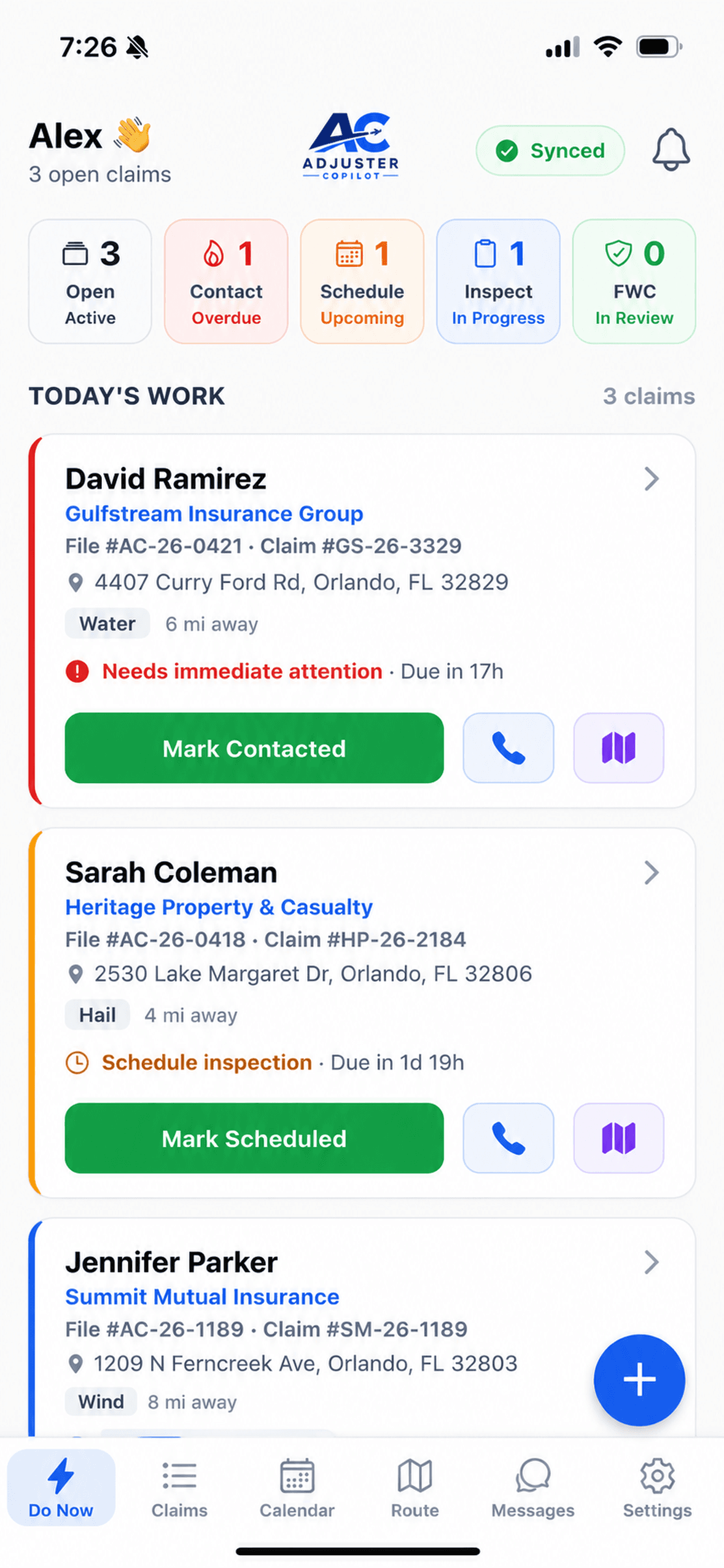
Adjuster Copilot — the day's claims and priorities on the Do Now dashboard
The independent adjuster workflow

One file should not require two separate workdays

Field work is hard enough without rebuilding the inspection later from a camera roll, handwritten notes, and memory. Adjuster Copilot keeps the documentation attached to the claim as the work happens.

Before the appointment

See active assignments and organize the driving order.

At the property

Follow the inspection, capture required details, and label photos in context.

Before handoff

Review the narrative and assembled report while the inspection is still fresh.

Assignment to report

A practical field workflow, step by step

Each screen below is from the current product using synthetic demonstration claim data.

  1. STEP 01

    Start with the day’s assignments

    Open a prioritized view of active claims, then choose the inspection that needs attention next.

  2. STEP 02

    Plan the route

    See nearby claims on a map, group same-day stops, and put them in a practical driving order.

  3. STEP 03

    Follow the guided inspection

    Work through the inspection in a consistent sequence with required items and progress visible.

  4. STEP 04

    Document the property

    Capture and label photos by area while the details are in front of you instead of sorting a camera roll later.

  5. STEP 05

    Review an AI-assisted narrative

    Generate a narrative draft from your field notes, then review and edit it before it becomes part of the file.

  6. STEP 06

    Complete the report

    Bring the documented inspection into an assembled report and photo sheet for final review.

Adjuster Copilot — suggested same-day claims and optimized stop order
Suggested same-day claims and stop order
Adjuster Copilot — guided inspection progress with required items tracked
Guided progress with required items visible
Adjuster Copilot — inspection photos captured and labeled by area
Inspection photos labeled by area
Review before completion

The draft stays under your control

Adjuster Copilot uses your field notes to draft the inspection narrative. Review the wording, correct the details, and approve what belongs in the file. The final judgment remains with you.

See how AI narrative generation works
Adjuster Copilot — AI-drafted inspection narrative from field notes
Adjuster Copilot — assembled inspection photo sheet report
Assembled inspection photo sheet
Current capabilities

What the app supports in the field today

These capabilities are available now; they are not roadmap promises.

Offline fieldwork

Continue the inspection when service is unreliable. Field work is stored on the device and syncs when a connection returns.

Guided inspections

Use a defined sequence of questions, required items, photo prompts, and signature capture for a more consistent file.

Photo documentation

Capture photos inside the claim workflow and label them by inspection area as you go.

Route planning

View claims geographically, identify practical same-day stops, and organize the order before driving.

AI-assisted narratives

Turn field notes into an editable narrative draft. The adjuster remains responsible for reviewing the final wording.

Reporting

Carry captured inspection details and labeled photos into an assembled report and photo sheet.

Fit and limitations

Know what the product does—and what it does not

A useful evaluation starts with clear boundaries.

Designed for field documentation

  • Independent adjusters managing assignments and property inspections
  • Work that must continue through weak or unavailable connectivity
  • A guided path from field capture through narrative and report review

Important current boundaries

  • AI drafts narrative text; it does not make claim or coverage decisions.
  • The adjuster reviews documentation and remains responsible for the final file.
  • Expanded report export formats are in development and are not represented here as available.
Read the AI usage and human-review policy
Buyer questions

Questions independent adjusters ask

Can I complete an inspection without cell service?

Yes. Adjuster Copilot is designed for offline fieldwork. You can continue the inspection and store work on the device, then sync it when a connection is available.

What does the AI do?

The current AI capability drafts an inspection narrative from the notes you capture. You review and edit the draft before using it. It does not make coverage or claim decisions.

Does the app help prevent missing documentation?

The guided workflow tracks required inspection items and prompts for required photos. The adjuster still reviews the file for accuracy and completeness.

What happens after the field inspection?

Your captured details, labeled photos, signatures, and reviewed narrative move into an assembled report and photo sheet. Expanded report export formats are still in development.

See the workflow

Evaluate it against your next inspection

Watch the product tutorials, or start a trial and work through the field workflow yourself.